Flutter doesn't use your proxy or trust your cert. Here's how we intercepted it anyway, and why the hardest wall wasn't one we were allowed to break.
"Let Google do its thing," I told the team as we were chasing down an OTP that wouldn't go through whenever we intercepted the app's traffic.
The target was a Flutter app, and somewhere in its login flow it leaned on a Google service I wasn't scoped to test, couldn't have broken anyway, and couldn't remove. My interception was stepping on it without me realizing it. Once I saw it was there, the fix was the boring part: leave Google's traffic alone, let it reach Google untouched, and keep listening to everything around it.
Flutter handles its own networking, and Dart never consults the phone's proxy settings. So the traditional approach of setting a Wi-Fi proxy and installing Burp's CA on the phone, would not work on Flutter; those requests go straight to the server and never reach Burp. That's why Chrome and Safari traffic showed up in Burp as expected, while the Flutter app stayed silent, without ever crashing.
This target was a different battlefield, so it needed a different set of tools.
This post is the story of why each tool was needed. If you just want the command-by-command playbook, it lives here: The Flutter interception playbook →
# Understanding Flutter and Dart
If you're familiar with web application frameworks, I'd describe Flutter and Dart as the web's equivalent of WordPress and PHP. Flutter is the framework that makes it easier for developers to build apps, while Dart is the programming language that every Flutter app is built on.
You can write Dart without Flutter, but you cannot use Flutter without Dart.
The reason developers love Flutter is its cross-platform ability: build once, and it runs on both iOS and Android. If iOS's Swift and Android's Kotlin had one interpreter fluent in both, that would be Dart.
Because Flutter has to run on both platforms, it cannot lean on each one's native UI the way Swift and Kotlin do. It is self-sufficient enough to ship its own rendering engine and runtime, and bundles its own networking and TLS stack inside the app.
Flip it to a pentester's point of view, and that self-sufficiency becomes two walls:
- Our Wi-Fi proxy works by setting a phone-level setting and assuming the app reads it. Flutter brought its own networking.
- Our CA trust works by adding a cert to the phone's trust store and assuming the app checks there. Flutter brought its own trust store.
To intercept traffic the normal way, two things have to be true: the app has to use your proxy, and it has to trust your cert. These are the two walls Flutter put up, and each one breaks a pentester's workflow on its own.
Let us take down each wall and get the traffic running through our proxy.
# Wall #1: Its Own Networking
Because Flutter brought its own networking, it ignores the phone's Wi-Fi proxy. Dart's requests, still ordinary L7 HTTP, go straight to the origin server instead of detouring through Burp.
Bypass: capture down at L3, where every packet shows up no matter which proxy the app decided to honor. Using PCAPdroid and gost, the target's traffic was routed to Burp while out-of-scope traffic was left untouched.
# Wall #2: Its Own Trust Store
A Flutter app's HTTPS goes through BoringSSL, bundled inside libflutter.so. With its own certificate-checking routine, traffic that was routed through Burp will fail this check.
Bypass: We used reFlutter to patch the verification routine inside libflutter.so, so it always returns valid.
reFlutter only works on an unencrypted APK; a packed binary gives the patch nothing to land on.
# There was no third wall: Out of scope, in the way
Even after the app's traffic was landing in Burp, I hit another roadblock. When testing the OTP feature, the server keeps rejecting my code even though the HTTP Response handed back a unique access token. Take the proxy out of the picture, and the app worked normally.
Our first guess, back when we were on mitmproxy on iOS, was that mitmproxy might be duplicating requests. But a duplicated request would have meant two OTP codes in my inbox, and there was only one, so we ruled it out.
Three clues pointed to Google's ecosystem as the blocker:
- Static analysis —
libapp.socontained Firebase plugin channel names, withflutter.io/firebase_authhandling the phone/OTP login. The app was wired to log in through Firebase. - Dynamic analysis — gost's log showed multiple retries to one IP during OTP login, which was
34.160.81.0. A reverse lookup on the IP shows that it resolves togoogleusercontent.com. - HTTP headers — On the iOS (TestFlight) build, an HTTP POST Request to the
/verifyCustomTokencarriedUser-Agent: FirebaseAuth.iOS/…and anX-Firebase-AppChecktoken, confirming the app uses Firebase Auth's Identity Toolkit endpoint.
We worked around it by routing Google's traffic straight to Google, never letting it touch Burp, and OTP started working.
The lesson: real engagements are as much about working within boundaries as breaking them.
Here's a diagram on how the interception worked.
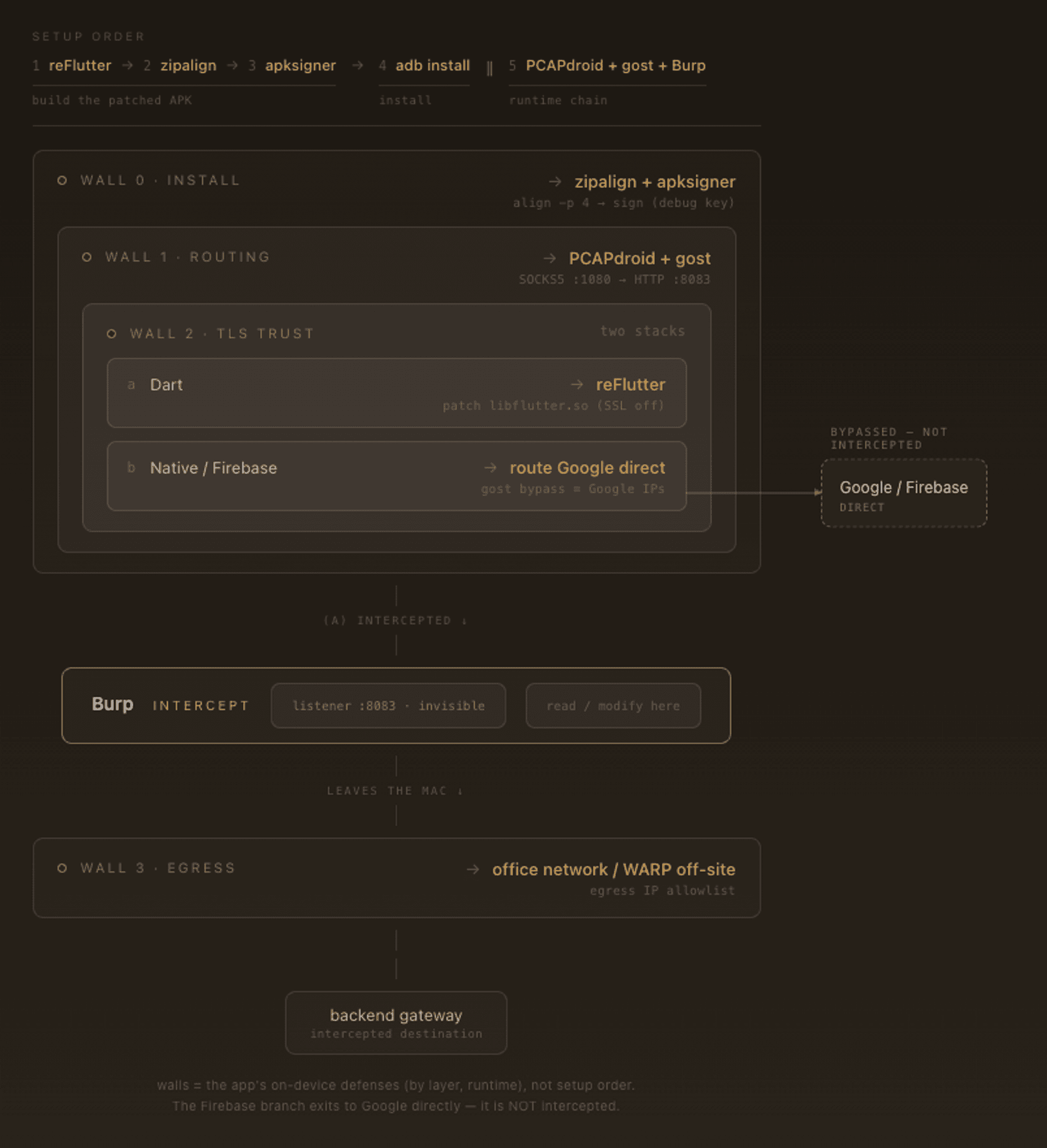
Full technical details on how we worked around the app are here. Thanks to Zet, who was a huge help brainstorming root causes and pointing me to some of the tools we used.
 Share this post
Tag
Recommendation

Discussion(login required)